
Creating FAQ
FAQ are predefined questions with fixed answers that are displayed to the user as clickable tiles at the start of a conversation. They are useful for the most common queries where you always want a precise and consistent answer — regardless of what the agent finds in sources.
How to do it
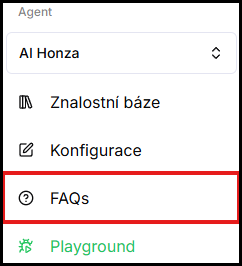
- In the left menu under the selected agent, click FAQs.
- In the top right corner, click Create FAQ.

-
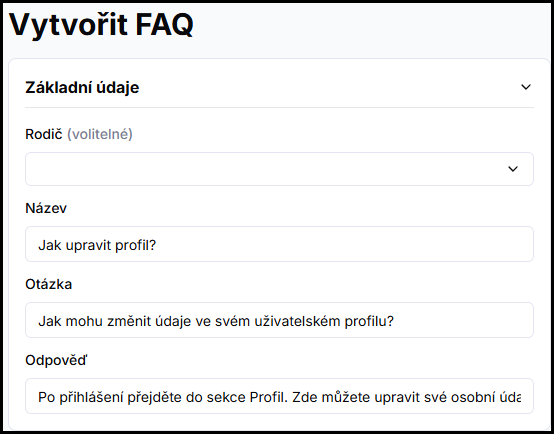
Fill in the fields:
- Title — a short description of the question displayed on the tile in the chat.
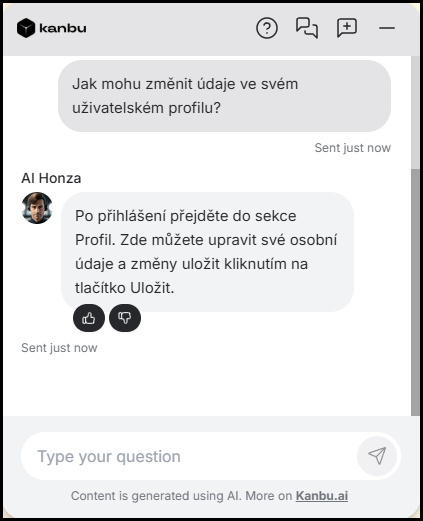
- Question — the full wording of the question shown to the user after clicking the tile.
- Answer — the exact text the agent will return.
- Parent (optional) — if you select a parent FAQ, this FAQ will appear in the chat only after the user clicks the parent. This way you can create branching question trees.
-
Click Save.

The FAQ will immediately appear in the list and is ready to use. You can preview the result in Playground.
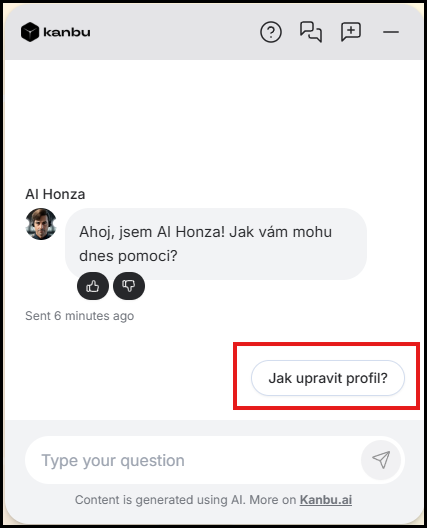
After clicking a question, its full wording and answer are displayed.
Frequently asked questions
-
What are FAQs in Kanbu settings for?
FAQs are predefined questions with fixed answers shown in chat as clickable tiles at the start of a conversation. They give fast, consistent answers to the most common queries (shipping, contact, returns…) without the agent searching sources. An FAQ answer does not consume credits.
-
When to use FAQ instead of a data source?
FAQ are suitable for the most common queries where you want to guide users at the start of a conversation — for example, shipping options, contact details, or the returns process. Users see them as clickable tiles and get an answer with one click, without consuming credits. For general information about products or services, it is better to add a data source and let the agent answer from it.
-
How many levels of FAQ branching can be created?
There is no technical limit on the number of levels, but for clarity we recommend a maximum of two — a main question and sub-questions.
-
Can FAQ be edited or deleted?
Yes, in the FAQ list click the specific entry, edit it and save, or delete it.
Related
- Adding sources — adding data for the agent's free-form responses
- Communication style — setting the agent's tone and behavior