
Language and multilingual support
Language settings determine which language the chatbot uses to communicate with users. You can either select a specific language or the Automatic mode, where the agent responds in the same language the user asked in. Automatic detection has its limitations — for best results, we recommend setting a specific language. Kanbu supports 39 languages.
1. How to do it
- Open Configuration — in the left menu of the application, click Configuration.
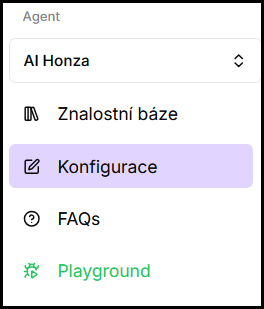
- Open the Language dropdown — a list of available options will be displayed.

- Select a mode — either Automatic (first item in the list) or a specific language from the 39 supported ones.
- Save changes — click Save.
2. What is configured
In the Language field, you choose between two modes:
-
Automatic (first in the list)
The agent recognizes the language of the user's query and responds in the same language. Detection may not be reliable for short or ambiguous messages — if the user only greets or writes a short sentence without diacritics, the agent may misidentify the language and respond in a different language than the user expects.
Specific language
The agent always responds in the selected language regardless of which language the user writes in. 39 languages are available.
In both modes, knowledge sources may be in a different language than the one the agent responds in — the agent will translate the necessary information itself.
3. Tips for best results
- Set a specific language if you know who your users are. The agent responds most reliably when it has a clearly defined language — automatic detection works well for longer sentences, but may fail for greetings or short messages without diacritics.
- Keep sources in the same language as the agent. Translation from sources works, but the best results come when sources and response language match.
- If you serve two different markets, consider two separate agents. One for each market with a specific language and matching sources is more reliable than one agent with automatic language detection.
Frequently asked questions
-
Can I guarantee that the agent responds only in one language?
Yes — instead of Automatic mode, select a specific language in the dropdown. The agent will then always respond in that language regardless of how the user asks.
-
What if sources are in a different language than the agent responds in?
The agent will translate the necessary information from sources into the target language itself. This applies in both modes — Automatic and specific language.
-
Which languages are supported?
Currently 39 languages. You can find the full list directly in the Language field dropdown.