
E-commerce agent

E-commerce is an agent type designed for online stores. It connects to a product feed and allows the chatbot to work with your product catalog.
1. What it can do
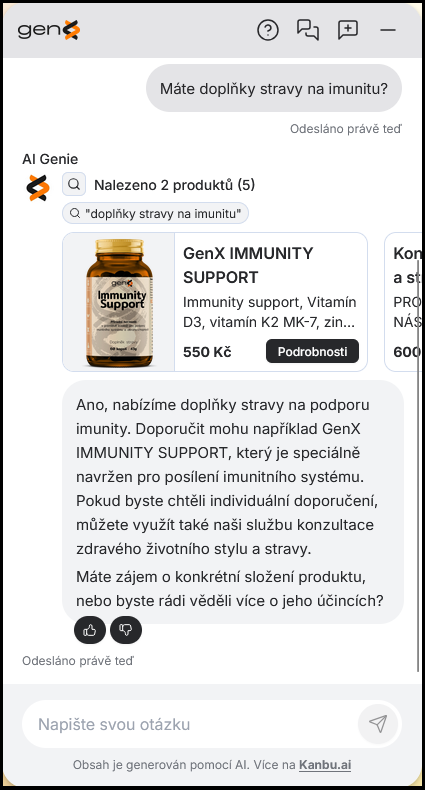
E-commerce connects to your product feed in XML format (a plain XML feed, Heureka, Zboží.cz, or Google Merchant) and allows the chatbot to search, filter, and compare products from the catalog. In responses, it can return specific products matching the user's query as a real product card — photo, price, and a plain-language reason it's recommending that particular item.
The recommendation is deliberate, not incidental: for a product question, the chatbot decides what to search for, builds a ranked shortlist of the most relevant results, and attaches a reason to each one — rather than just happening to mention a product in passing.
At the same time, it retains the capabilities of the AI assistant type — it also answers from web pages, documents, and PDFs, and when it cannot handle a query, it can transfer the conversation to a live operator.
What else the E-commerce agent can do
- Product comparison — the chatbot can put two or more catalog products side by side and summarize the differences.
- Similar products — for a given product, it can suggest alternatives or add-ons on its own.
- Feed health at a glance — in the feed list you can see at a glance which products imported cleanly, which failed, and why, without digging through a log.
- Product attributes — the chatbot can infer attributes (color, size, material...) from the product description on its own, and you can also edit them by hand. Attributes sharpen both filtering ("under 20,000 CZK", "in stock", "size M") and recommendations — units are also converted automatically when filtering, so "under 1 liter" also matches a product listed as 500 ml.
- Image enrichment (optional, paid) — turn it on for a feed and the chatbot can actually "see" your product photos, not just read the text description. Visual details then factor into both search and recommendations.
- Honesty over guessing — the chatbot is tuned to say "I couldn't find that" rather than make up a product. It only recommends what's actually in your feed.
2. When to choose E-commerce
Choose E-commerce if you run an online store and want the chatbot to work with your product catalog — recommend specific products, compare variants, or filter by parameters. An XML feed with products is required.
If your chatbot only answers general queries from the web or documents and does not work with a product catalog, the AI assistant type is sufficient.
3. How to get started
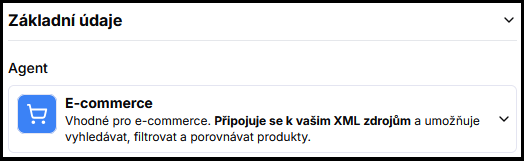
- Verify that you have the E-commerce type set in Configuration — see Agent types for the switching process.
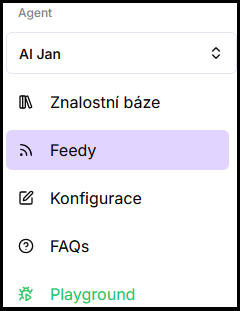
- Upload a product feed (XML, Heureka, Zboží.cz, or Google Merchant) in the Feed menu, which becomes available in the main application menu after switching the type.
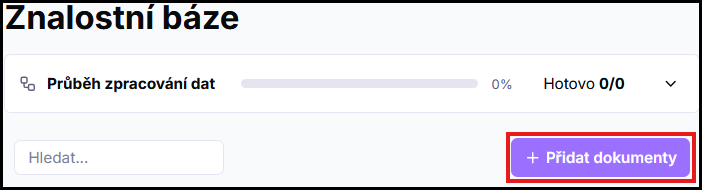
- Optionally add other sources (web, documents) for general queries — see Adding sources.
- Test the chatbot in the preview and fine-tune the feed and sources based on real queries. The chatbot should display previews of the queried products.
4. Example use case
An electronics store switches the agent type to E-commerce and uploads an XML feed with its catalog. When a customer asks for a laptop under 20,000 CZK, the chatbot returns specific models from the feed matching the parameters. General queries (shipping, returns) are still answered from the website.
Frequently asked questions
-
How does E-commerce differ from the AI assistant?
E-commerce does everything the AI assistant does and additionally connects to a product feed — it can search, filter, and compare products from the catalog.
-
Do I need a product feed to use this type?
Yes — product features only work with an uploaded feed. If you do not have a catalog, choose the AI assistant type directly.
-
Does it have to be XML?
Yes, the feed has to be in XML format — either a plain product XML feed, or the Heureka, Zboží.cz, or Google Merchant schema. If you're not sure whether yours is supported, check with your Kanbu contact.
-
Can I combine a product feed with web and documents?
Yes. E-commerce works with the feed and regular sources simultaneously — product queries are handled from the feed, general ones from the web and documents.
-
How do I know my feed imported correctly?
The feed list shows each feed's status and how many products failed to import or process — including the reason, for failed items.